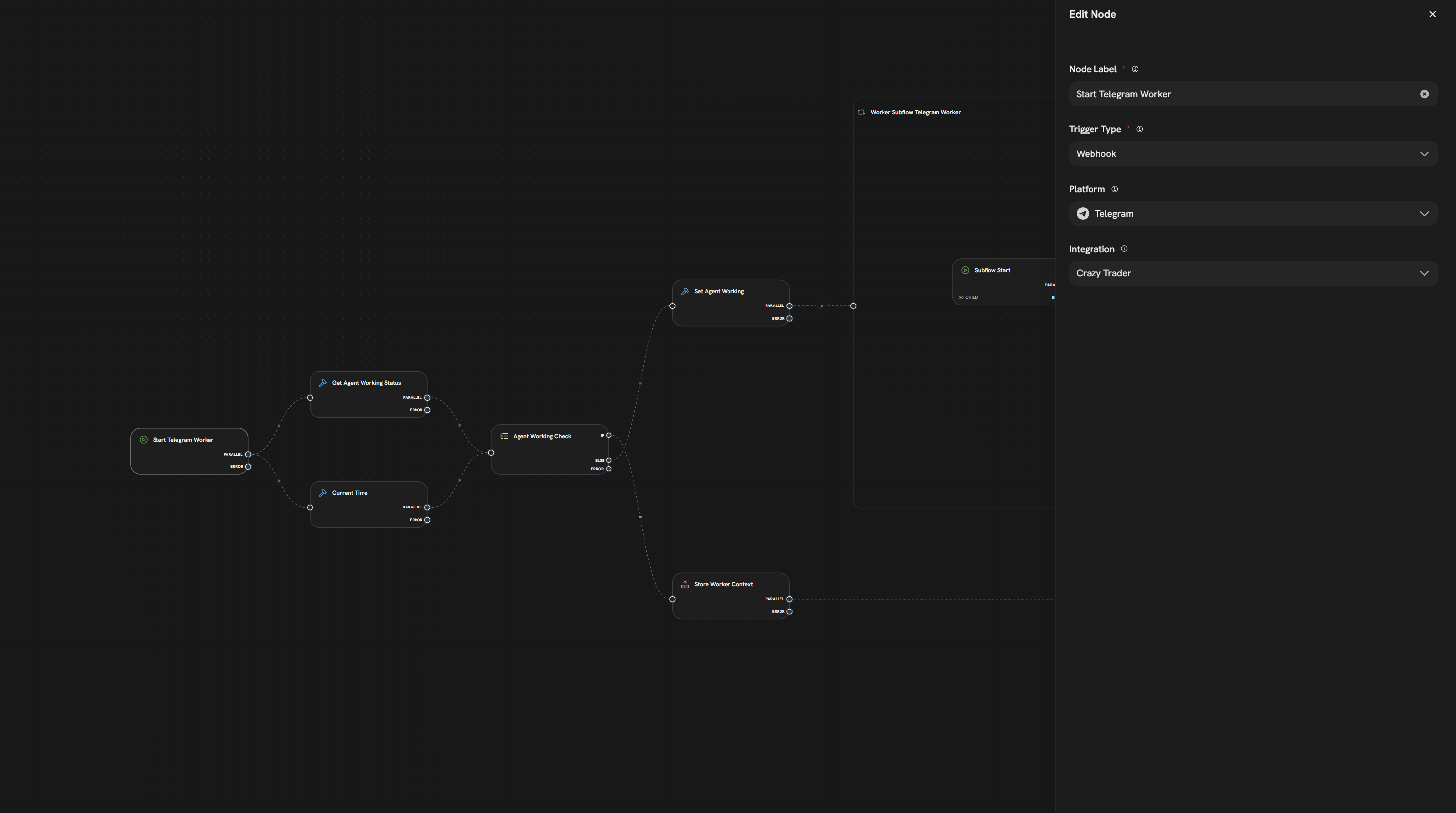
The workflow construction logic differs significantly from n8n, so despite my experience in other environments, I was unable to configure and run a simple workflow that would receive a webhook from Telegram and return the result.
Splox Builder (template) in chat mode built a workflow for me. I tried to edit it manually, but couldn’t figure it out.
I connected Devops Engineer (template) in chat mode to analyze JSON, which completely rewrote the workflow, generated an archive with a bunch of .md files and a new .json for import.
But it still doesn’t work.
I’ve burned through $4 on these attempts.
I had to rack my brains to find the ‘webhook_id’ code to activate it, but I found it in Integrations.
It worked out of the box with simple messages.
Next, how do you recommend expanding the workflow: using an agent or can it be edited manually?
At the first stage, I would use the built-in agent to understand the logic step by step.
Which of these two templates helps, Splox Builder or Devops Engineer? Or neither, and we only edit WF manually?
I apologize for such basic questions. The tool is really a step ahead of similar ones, but many steps are still unclear to me (either it is already implemented or something still needs to be written).
Important clarification about how to approach building in Splox:
There are two completely different approaches, and mixing them up is where the confusion (and wasted credits) happens:
Approach 1: Building workflows with nodes (manual)
For structured logic like if/else, switching between options, API calls, data processing - use nodes like Switch, Tool Nodes, etc.
Drag, drop, and connect nodes manually in the visual editor
This is traditional workflow building - perfect for learning the platform and handling deterministic logic
No agents needed - and it’s completely free
Approach 2: Using agents as intelligent developers
DevOps Engineer: Acts as an actual human developer you can chat with
Example: “Here’s my Telegram Bot Token *****. Build me a bot with features: x1, x2, x3. Then deploy and run it so I can test.”
It will write code, deploy it, and get it running for you
Splox Builder: Creates complex multi-agent systems
Think of it as assembling a team of AI agents (like human developers) with sophisticated, non-linear logic
Use this when you need multiple agents collaborating on complex tasks
These agents are for when you need intelligence and autonomy, not just workflow logic.
The mistake you made:
You asked agents to help you configure simple workflow nodes. But Splox Builder is specifically designed to create agents. That’s why it burned through credits without solving your problem.
What you should have done:
Option A: Build the workflow manually using nodes (for simple bot logic with predictable flows)
Option B: Ask DevOps Engineer to CREATE the entire Telegram bot from scratch - give it your token and describe what you want, then let it build everything. You don’t need to mention Splox or workflows to agent at all. DevOps Engineer acts like a real developer.
So, what are you actually trying to build?
Simple bot with message routing and basic responses? → Manual workflow editing (free) or ask DevOps Engineer to build it (costs credits but faster) in sandbox or your own server.
Intelligent agent or multi-agent system that handles complex conversations and autonomous tasks? → Use Splox Builder to architect it
Let me know what you’re aiming for and I can guide you to the right approach!
It didn’t work. I launched DevOps Engineer and asked him to make additions to the basic Simple Telegram Worker.
He did his job, outputting files (lots of .md, databases, etc.), but he also uploaded the .json file itself (without making any changes to the existing one).
He didn’t stop there and continued something in a loop (I didn’t notice it right away and interrupted the process).
Another $20 down the drain, he has Sonnet 4.5 (not a cheap model) in his settings.
But he didn’t let me import the .json file as a workflow — “Failed to decrypt workflow: ciphertext too short.”
It exports the rest in encrypted format, apparently in the same encrypted format, and waits for its import.
I think I overloaded the request and gave it too complex a task instead of simple step-by-step instructions in human language.
I would appreciate a how-to or a link to documentation on how to refine an already created workflow as an agent.
You didn’t do anything “wrong” conceptually — the problem is that this specific approach cannot work because of how Splox stores workflows internally.
Why DevOps Engineer couldn’t “fix” your existing workflow
The .json workflow you see in Splox is encrypted. That means:
The workflow content is stored as ciphertext on the backend.
Only Splox (with its private key) can decrypt it.
An external agent like DevOps Engineer has no access to that key, so:
It can’t read your existing node structure.
It can’t modify the encrypted workflow file in any meaningful way.
If it tries to export/import that encrypted JSON, you’ll just hit errors like Failed to decrypt workflow: ciphertext too short because the format is not what the app expects.
So when you send your exported workflow JSON to DevOps Engineer and ask it to “edit” it, it’s basically blind. It’s just manipulating opaque encrypted text, not a real editable structure.
The right way to use DevOps Engineer here
Instead of asking it to rewrite an existing encrypted workflow, treat DevOps Engineer like a human developer:
Describe your goal in plain language, e.g.:
“ Here’s my Telegram Bot Token *****. Build me a bot with features: x1, x2, x3. Then deploy and run it so I can test.”
Give it your Telegram bot token (and any other necessary credentials, test chats, etc.).
Let it:
Scaffold a new project or service.
Write the bot logic (Python/Node/whatever).
Set up the commands, handlers, routing, etc.
Summary
You can’t directly edit an exported Splox workflow JSON with DevOps Engineer, because it’s encrypted and unreadable to the agent.
Instead of asking it to “modify the workflow”, just ask it in normal language to build or extend a bot, give the token, and let it generate code / logic from scratch.
For simple, deterministic logic → use Splox workflow nodes manually (free and transparent).
If you tell me specifically what behavior you want your bot to have (step by step, like: “when user does X, bot replies Y”), I can help you phrase an exact prompt for DevOps Engineer or show you how to wire it with nodes.
The code for the bot was written in a few hours by DevOps Engineer (built-in template) simply by submitting simple commands and clarifications on tasks.
I managed to export the structure to GitHub.
The next step is to figure out whether SPLOX supports the created bot 24/7 or whether it needs to be taken down and hosted on our own servers.
Currently, Sandbox shuts down after a period of inactivity (I assume this is done on purpose to save the user money).
 Steps
Steps